
At the end of January 2026, our teams launched a highly anticipated enhancement: Automatic faculty qualification.
Previously, the calculation of the qualification level of your faculty members at a given date was provided for informational purposes only and was not applied in your database. You could then choose whether or not to apply the recommendation, either manually or via an import of the Faculty table.
This feature has been significantly improved to:
- Save you time: you can now automatically apply the qualification levels proposed by Academ directly in your database, without modifying faculty profiles or exporting/reimporting your tables.
- Enhance compliance: this improvement helps you better meet the standards and requirements of accreditation bodies.
How does it work?
ℹ️To use this feature, you must first have qualification rules set up in your Academ solution.
❓ Haven’t set up your Qualification Rules in Academ yet? Contact your point of contact to discuss your needs and implement them.
Once your Qualification Rules are configured, Academ can calculate and apply the qualifications of your faculty members.
The system compares the criteria defined in your Qualification Rules with the information in each faculty member’s profile: degrees obtained and dates, published intellectual contributions, and other activities.
The calculation can be run:
- in bulk, for multiple faculty members at once,
- or individually, from a faculty member’s profile if needed.
You can also manually adjust the qualification levels in the database for one or more faculty members after using the Academ calculation.
⚠️ Warning: if the Academ calculation is later rerun for all active faculty members, your manual changes will be overwritten and will need to be reapplied if necessary.
Apply the Academ Calculation in Bulk
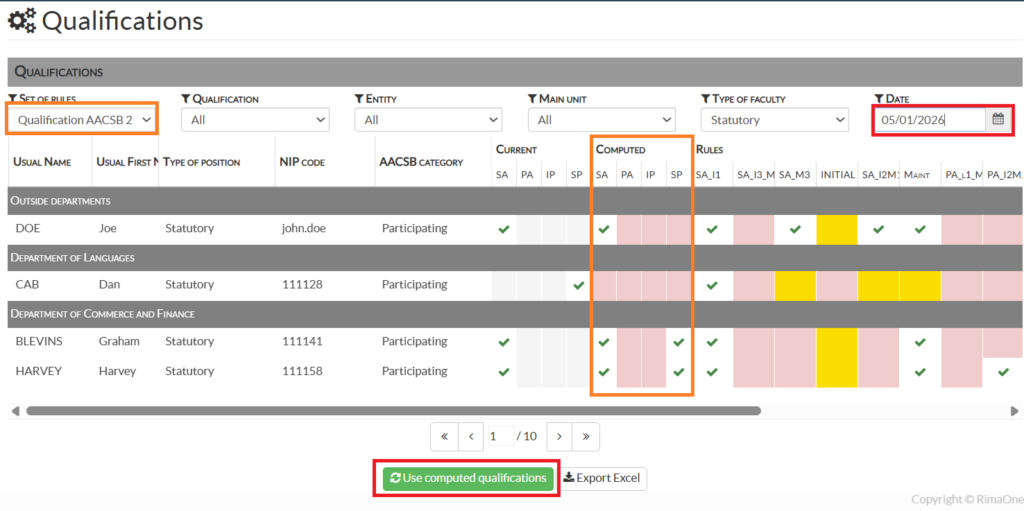
From the left-hand menu: Multidimensional Analysis > Faculty Qualifications
- Select the group of qualification rules to apply for the calculation, for example: AACSB 2020
- Choose:
- Either a specific qualification to apply: “I want to display all active faculty members eligible for the SA qualification”,
- Or all possible qualifications. This option is recommended to view and apply the qualification level calculated by Academ.
- Select the department and the type of faculty members concerned by the calculation.
- Specify the date on which you want to run the calculation: the system will then determine the faculty members’ qualification levels based on the information in their CVs at that date.
The result of the Academ calculation appears in the “Computed” column of the table. - Click the Use computed qualifications button.
The qualification will be applied in the “Current” column of the table.
If a faculty member already had a qualification in their profile at that date, it will be replaced by the qualification calculated by Academ.
⚠️ Warning: only faculty members active on the selected calculation date will be taken into account.
ℹ️ You can select a past date to calculate the qualification level of all faculty members who were active at that time.
The qualification level will be applied to the faculty member’s profile for the selected date and can then be used for your reports.
ℹ️ If a faculty member is eligible for multiple qualification levels, the highest level will be applied.
Order of application of AACSB qualifications
From the most important level to the least important:
- SA
- PA
- SP
- IP
Understanding the table
✔️: The faculty meets the qualification level.
Red box: The instructor does not meet the qualification level.
Yellow box: The instructor is not subject to the qualification rule.
Apply the Academ Calculation per Faculty Member
Go to the profile of the relevant faculty member:
- Either from the main left-hand menu: Faculty Roster > Open Curriculum Vitae > Personal Information > Accreditation tab.
- Or from Multidimensional Qualification Analysis: double-click the faculty member’s name in the table to be taken directly to the Accreditation tab of their profile.
In the Qualification section, select the rule group to use, as well as the date on which you want to run the calculation.
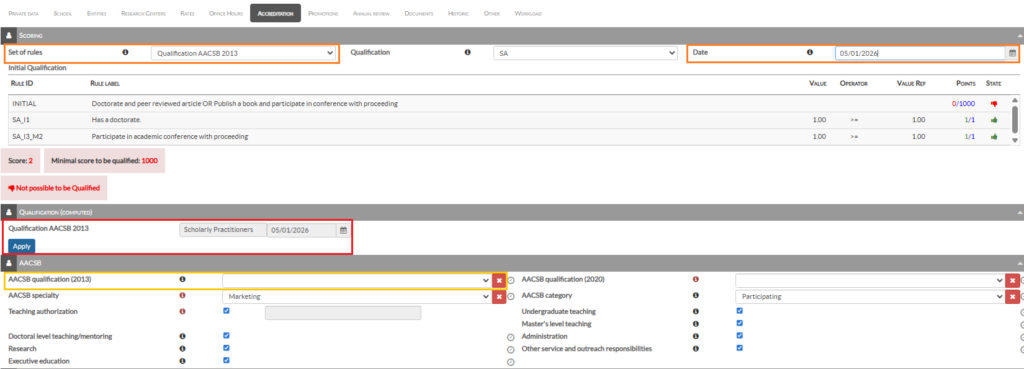
⚠️ A calculated qualification proposal is displayed only when the corresponding field in the section below is empty.
If the field is already populated, no proposal will be generated. Clear the field to receive a proposal.
Example: in the image above, the AACSB Qualification (2013) field highlighted in yellow must be empty in order to display the computed qualification.
The qualification level proposed by Academ appears in the Computed Qualification area.
To apply it to the faculty member, click the “Apply” button.
ℹ️ The level can also be selected manually from the area below, with an associated date.
⚠️ Important: whether you apply the level calculated automatically by the system or enter a level manually, the most recently saved level is always the one that will be taken into account in the database.